Bouquet of Hearts: A Guide to Using Romantic Paper Art Effectively
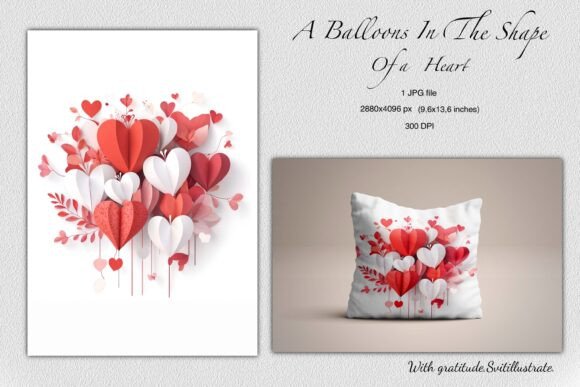
When searching for the perfect visual to convey deep affection, a Bouquet of Hearts often stands out as a timeless choice. This specific design features a beautiful arrangement of paper hearts in red, white, and pink, surrounded by delicate floral elements. It captures the essence of romance without relying on clichéd imagery, offering a sophisticated aesthetic that appeals to both paper art lovers and those seeking unique ways to celebrate Valentine’s Day, anniversaries, or weddings. However, having access to high-quality digital assets is only half the battle; understanding how to utilize them correctly ensures your final project looks professional and intentional.
Understanding the Value of High-Resolution Assets
The appeal of a Bouquet of Hearts lies in its intricate details. The interplay between the layered paper hearts and the soft floral surroundings creates depth and texture that flat graphics simply cannot match. For creators, this asset comes packaged with significant technical advantages: a 300 DPI resolution at dimensions of 2880x4096 pixels (9.6 x 13.6 inches). These specifications are not just numbers; they represent the difference between a crisp, gallery-worthy print and a blurry, pixelated disappointment.
Many beginners overlook the importance of DPI (dots per inch) when selecting images for physical projects. If you download an image intended for web use—typically 72 DPI—and attempt to print it on a large greeting card or poster, the result will be jagged and unprofessional. The Bouquet of Hearts file provided here is specifically optimized for print, ensuring that whether you are creating wedding invitations or scrapbooking pages, the lines remain sharp and the colors vibrant.
Common Mistakes When Sourcing and Using Digital Art
Even with a high-quality file, users frequently make avoidable errors that compromise the final outcome. One of the most common misunderstandings involves color management. While the preview on your screen may show vivid reds and soft pinks, printed output can vary significantly depending on your printer settings and paper type. Without proper calibration, the delicate balance of the Bouquet of Hearts palette can shift, turning elegant blush tones into muddy browns or harsh neons.
Another frequent oversight is ignoring the file format limitations. You receive one ZIP file containing a JPG image. While JPGs are versatile, they are lossy formats, meaning some data is discarded during compression. If you plan to manipulate the image heavily—such as cropping it aggressively for social media stories or blending it with other complex layers—you might notice artifacts around the edges of the hearts. For simple printing and direct application, the JPG is perfect. For advanced graphic design requiring transparency, you would typically need a PNG or vector file. Understanding this distinction prevents frustration when you find the background won't disappear as expected.
How Technical Errors Impact Your Projects
The consequences of these mistakes extend beyond aesthetics; they affect usability, cost, and satisfaction. Imagine designing a set of wedding invitations featuring the Bouquet of Hearts, only to realize after printing 50 copies that the text is illegible because the image resolution was stretched too thin. This leads to wasted materials, increased costs, and a rushed timeline to fix the error. Similarly, using low-resolution versions for social media banners can damage a brand's reputation, signaling carelessness to potential clients or followers.
In the context of DIY projects, such as decorating gift boxes or creating personalized keepsakes, poor image quality can ruin the tactile experience. The charm of paper art relies on the illusion of texture. If the image is pixelated, that illusion breaks, making the craft look amateurish rather than artistic. For small business owners selling printable templates or custom stationery, maintaining high standards is non-negotiable. A single blurry product can lead to negative reviews that are difficult to overcome.
Practical Advice for Better Results
To avoid these pitfalls, start by verifying your workspace before you begin. Ensure your design software is set to 300 DPI if you intend to print. When working with the Bouquet of Hearts image, resist the urge to scale it up beyond its original dimensions. Since the file is already 2880x4096 pixels, it offers ample room for standard print sizes like A4, Letter, or even larger posters without needing enlargement. Enlarging an image digitally forces the computer to guess missing pixels, resulting in blurriness.
Color correction is another critical step. Before committing to a full print run, always produce a test copy on the same paper stock you plan to use for the final product. Check how the red, white, and pink hues translate from screen to paper. If the reds appear too dark, adjust the brightness or contrast slightly in your editing software, but do so subtly to maintain the natural look of the floral elements.
For digital applications, such as website headers or blog posts, you have more flexibility. However, you should still optimize the file size. A 300 DPI image is heavy for web loading. Use an image optimizer to reduce the file weight while retaining visual quality. This ensures your website loads quickly, improving user experience and SEO performance, without sacrificing the beauty of the heart arrangement.
Ideas for Creative Application
Once you have mastered the technical aspects, the possibilities for the Bouquet of Hearts are vast. Here are several practical ways to apply this asset effectively:
- Greeting Cards and Invitations: Use the central arrangement as the focal point for Valentine's Day cards or wedding invitations. The vertical orientation (9.6 x 13.6 inches) fits perfectly on standard cardstock layouts, allowing space for heartfelt messages.
- Scrapbooking and Journals: Print the image on matte photo paper to create a textured page element. Layer it with actual dried flowers or ribbon to enhance the "paper art" feel, creating a mixed-media masterpiece.
- Gift Decorations: Scale the design down to create custom tags or labels for gift boxes. The romantic theme makes it ideal for engagement parties or anniversary presents.
- Social Media Content: Crop sections of the bouquet for Instagram stories or Pinterest pins. The high resolution allows you to zoom in on the delicate floral details for close-up shots that grab attention.
- Web Design and Blogs: Incorporate the image into romantic-themed blog headers or digital greeting cards. Ensure you compress the file appropriately to maintain site speed.
- DIY Home Décor: Frame the printed image as wall art or use it as a backdrop for shadow boxes containing mementos from special occasions.
What to Check Before You Buy or Download
Before finalizing your decision to use the Bouquet of Hearts, consider your specific needs. Are you looking for a transparent background? If so, remember that the provided JPG includes a background, which may require removal using photo editing tools. Do you need vector scalability? If your project requires the image to be resized infinitely without quality loss, a raster JPG may not suffice, and you might need to seek a vector version.
Also, verify the licensing terms associated with the download. While many assets are suitable for personal and commercial use, some restrictions may apply to reselling the raw file itself versus using it in a derivative work. Always ensure you have the right to use the image for your intended purpose, whether it's a personal scrapbook or a client's wedding invitation suite.
By paying attention to resolution, color accuracy, and file format limitations, you can transform a simple digital image into a stunning piece of art. The Bouquet of Hearts offers a versatile foundation for creativity, but it is your attention to detail that will bring the romance and elegance to life. Whether you are a seasoned designer or a hobbyist crafting a special gift, taking these steps ensures your project is as memorable as the occasion it celebrates. Happy creating.