Empty State 3D Illustrations: A Practical Guide for Designers and Developers
In the evolving landscape of digital product design, the "empty state" is often an overlooked yet critical component of user experience. These are the screens users encounter when there is no data to display—such as a new inbox with zero emails, a shopping cart waiting for items, or a dashboard awaiting configuration. Traditionally filled with flat vector graphics or generic stock photography, these moments are now increasingly defined by Empty State 3D Illustrations. This shift represents more than just a stylistic trend; it reflects a deeper need for depth, engagement, and emotional resonance in interfaces where content is absent.
For professionals aged 20 to 50 who are evaluating resources for web design, UI development, or presentation materials, understanding the value proposition of 3D assets is essential. Unlike static 2D elements, 3D illustrations offer tangible volume and lighting effects that can guide user attention and soften the frustration of an empty interface. However, integrating these assets requires a careful assessment of technical requirements, workflow compatibility, and aesthetic goals.
Defining the Role of Empty State 3D Illustrations
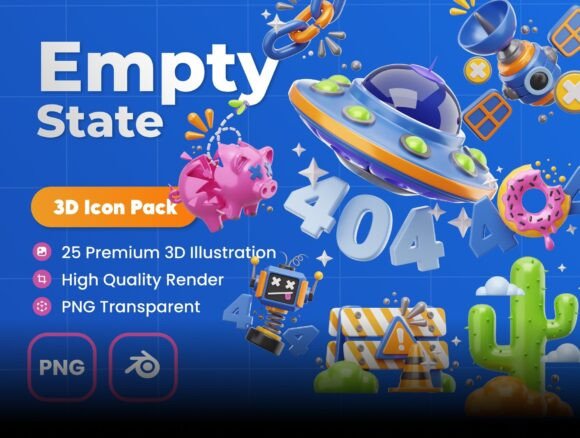
Empty State 3D Illustrations are specifically crafted visual assets designed to occupy whitespace in applications and websites. Their primary function is twofold: to communicate the current status of the system clearly and to encourage specific user actions. What distinguishes this category from general 3D art is its contextual precision. These illustrations are not merely decorative; they are functional components of the information architecture.
The distinct advantage of using 3D over traditional 2D vectors lies in the perception of realism and texture. A 3D illustration can cast shadows, reflect light, and possess a sense of weight that flat icons cannot replicate. This added dimension helps break the monotony of standard interface layouts, making the application feel more modern and polished. When a user lands on a blank page, a well-rendered 3D character or object can provide a moment of delight, transforming a potential dead-end into an engaging interaction point.
Comparing 3D Assets with Traditional Alternatives
When deciding whether to incorporate Empty State 3D Illustrations into a project, it is necessary to compare them against established alternatives like flat design, line art, and photographic imagery. Each approach carries different tradeoffs regarding file size, scalability, and cognitive load.
- Flat Design and Vector Graphics: Flat illustrations are lightweight and scale infinitely without quality loss. They are excellent for minimalistic interfaces and fast-loading mobile apps. However, they can sometimes feel sterile or generic, lacking the personality that 3D elements bring.
- Photography: Real-world photos add authenticity but can be heavy on bandwidth and may not align with a brand's illustrative style. They also risk dating quickly as technology and trends evolve.
- 3D Illustrations: These sit between the two extremes. While they require higher resolution files (often 3000 x 3000px or more) to maintain crispness, they offer a unique blend of playfulness and professionalism. The ability to manipulate lighting and angles allows for a cohesive visual language that matches complex UI themes better than rigid flat art.
The decision often comes down to the desired tone of the product. If the goal is ultra-minimalism and speed, flat vectors might remain superior. However, for products aiming to build an emotional connection or stand out in a crowded market, Empty State 3D Illustrations provide a competitive edge that static images struggle to match.
Evaluating Technical Specifications and Workflow Integration
A significant factor in choosing a resource for your design projects is the flexibility of the files provided. Many designers face the challenge of finding assets that fit their specific color palette or layout constraints. High-quality Empty State 3D Illustrations packages address this by offering editable objects and customizable colors.
Consider the typical workflow for a UI designer. When a client requests a change in branding colors, having access to source files or editable layers can save hours of work. In contrast, pre-rendered PNGs with fixed colors force the designer to either accept the mismatch or spend time manually recoloring the image, which can degrade quality. Resources that include Blender files alongside high-resolution PNGs offer the best of both worlds: immediate usability for quick mockups and deep customization for final production.
The inclusion of editable objects means that designers can adjust the composition, move elements, or even swap textures to better suit the context of the empty state. For instance, if an illustration depicts a mailbox, being able to change the color of the mailbox to match the app's primary button color ensures visual harmony. This level of control is particularly valuable for agencies managing multiple clients with diverse brand guidelines.
Use Cases: Where 3D Empty States Excel
Not every screen requires a 3D treatment, but certain scenarios benefit significantly from the depth and detail these illustrations provide. Understanding when to deploy Empty State 3D Illustrations can maximize their impact.
Web Applications and Dashboards
SaaS platforms and complex dashboards often have numerous states where data has not yet been populated. A 3D illustration here can serve as a friendly guide, explaining what needs to happen next. The three-dimensional nature of the asset draws the eye more effectively than text alone, reducing bounce rates on initial setup screens.
Presentation Slides and Marketing Materials
Beyond software interfaces, these assets are highly effective in pitch decks, posters, and marketing collateral. In a presentation, a 3D icon representing "growth" or "connection" adds a layer of sophistication that flat clipart lacks. The high resolution (3000 x 3000px) ensures that these images remain sharp even when projected on large screens or printed on high-quality paper.
Mobile Onboarding
During the onboarding process of a mobile app, users are forming their first impressions. A playful 3D character guiding them through features can humanize the brand. Because these illustrations are ready to render and easy to use, developers can integrate them quickly without needing extensive 3D modeling skills.
Decision Factors: Strengths, Limitations, and Tradeoffs
While Empty State 3D Illustrations offer compelling benefits, they are not a universal solution. A balanced evaluation requires acknowledging their limitations.
Strengths: The primary strength is versatility. With a collection of 25 unique icons, designers can cover a wide range of scenarios—from "no search results" to "payment successful." The ability to edit colors and objects ensures longevity, as the assets can be adapted as the product evolves. Furthermore, the "ready to render" aspect streamlines the handoff between design and development teams.
Limitations: The main tradeoff is file size. High-resolution 3D renders are heavier than simple SVGs. For extremely bandwidth-constrained environments, such as low-connectivity regions or legacy devices, optimization becomes crucial. Additionally, while the assets are editable, they still require a degree of familiarity with design tools to fully exploit the customization options. A designer comfortable only with basic drag-and-drop tools might find the full potential of Blender files slightly challenging to unlock without a learning curve.
Choosing the Right Resource for Your Project
When selecting a library of Empty State 3D Illustrations, look for resources that prioritize both quality and flexibility. The ideal package should offer a balance of ready-to-use PNGs for immediate implementation and source files for long-term customization. A set containing 25 unique icons provides enough variety to avoid repetition across different screens without overwhelming the user with too many choices.
Furthermore, consider the support available. A resource that encourages direct contact for questions indicates a commitment to user success. Whether you need advice on how to adjust lighting in Blender or guidance on integrating the assets into a specific framework, having access to the creator can resolve roadblocks quickly.
Ultimately, the choice to use 3D illustrations depends on your project's specific needs. If your goal is to enhance user engagement, modernize your UI, and provide a polished look for presentations and web designs, then investing in high-quality, editable 3D assets is a strategic move. By carefully weighing the tradeoffs between file weight and visual impact, you can determine if this approach aligns with your broader design strategy.
As the digital landscape continues to mature, the distinction between functional and delightful design becomes less blurred. Empty State 3D Illustrations represent a tool that bridges this gap, offering a practical way to turn empty spaces into opportunities for connection and clarity. Whether you are refining a startup's MVP or updating an enterprise platform, these assets provide the unique elements needed to elevate your design work.